


SECOND TERM
SUBJECT: COMPUTER STUDIES CLASS: JSS3
SCHEME OF WORK
WEEKS TOPIC
- Revision of Last term work
- Spreadsheet Packages; Meaning and Uses
- Spreadsheet Packages; Features and Terminologies, Loading and Exiting Spreadsheet Packages
- Worksheet: Starting Excel Worksheet, Formatting Worksheet
- Worksheet: Excel Calculations, Creating Graphs, Formatting Graphs
- Hacking
- Hacking Community
- Logic Circuit
- Computer Career Opportunities
- Qualities of Good Computer Professional
- Revisions.
- Examination
Ref book: Early Learning of Computer studies by Yomi Soyombo
Internet
WEEK TWO
TOPIC: SPREADSHEET I
DEFINITION OF SPREADSHEET: A spreadsheet is a collection of cells organized into rows and columns where data is stored and manipulated. The spreadsheet is known as worksheet. A spreadsheet begins with row number one and column A. A cell is a space in a worksheet formed by the intersection of a row and a column. Each cell can contain a number, text or formula. A cell can also reference another cell in the same worksheet, the same workbook or a different workbook. Each cell has an address called Cell Reference e.g. A1, B3, C7 etc. combination of more than one sheet is referred to as workbook. The worksheets can accept thousands of rows of data and columns in form of fields. Active Cell is recognized by heavy border surrounding. It is the cell that is currently worked upon.
A SPREADSHEET
CONTENT OF SPREADSHEET
When you are setting out a spreadsheet, you have to enter values, labels and formulas.
- VALUES: Values are those numbers you already know before starting the spreadsheet operation. These values are inserted into cells of the spreadsheet.
- FORMULA: Formulas are the mathematical equations you insert into the cells. Formulas are commands that instruct the computer on what to do.
EVALUATION
- Define a worksheet.
- What do you understand by cell reference?
USES OF SPREADSHEET
There are various uses of spreadsheet. It uses varies according to the intended purpose. Some of its uses are as follows:
- Spreadsheets are used for administrative functions.
- Spreadsheets are used for creating reports.
- They are used for preparation of daily sales.
- They are used in computing school results.
- They are used for project budgeting control.
- They are used for drawing balance sheets.
- Excel can store and calculate the data as directed using existing data.
- Spreadsheet can be used for analysis and decision making.
- It makes calculations much easier than working things out yourself.
GENERAL EVALUATION
- State the uses of spreadsheet.
- Excel can be used to create analysis, Explain.
- What is an active cell?
- What are the contents in spreadsheet?
READING ASSIGNMENT: Modern Computer studies by Victoria, page 25
WEEKEND ASSIGNMENT
- A cell can also reference another cell in the same……..A. worksheet B. workbook
C. cellular D. sheet
- Spreadsheet can be used for data analysis and…………making A. cell B. decision
C. data D. reference
- The………….. can contain thousands of rows of data and columns in form of fields. A. cell B. worksheet C. reference cell D. excel
- The cell that is been currently worked upon is known as ……………cell. A. current B. active C. reference D. initial
- A ……….. can also reference another cell in the same worksheet. A. cell B. sheet
C. worksheet D. none
THEORY
- Define an active cell.
- List and explain the THREE major contents in a spreadsheet.
WEEK THREE
TOPIC: SPREADSHEET II
EXAMPLES OF SPREADSHEET
There are various types of spreadsheet software which include:
- Microsoft excel
- Lotus 1-2-3,
- Starview,
- Supercal, etc.
MICROSOFT-EXCEL
Out of the many examples of spreadsheet packages, Microsoft excel is the most commonly used because of its friendly features. Microsoft excel is part of Microsoft suite. The suite comes in various version such as 2000, 2005, 2007,2010, 2015 etc.
Ms-Excel is primarily used for analysis and calculation due to its flexibility. It has a lot of calculating features and mathematical formulas. Various kinds of mathematical calculations can be done using MS excel. Microsoft Excel is a spreadsheet package used mainly for mathematical calculations and numerical analysis. Examples of calculations that can be performed using MS Excel include; addition, subtraction, multiplication, division, average, etc.
Formulas are often used to carry out calculations in Ms-Excel. The desired formula for any calculation must be preceded with an equal sign (=).
STARTING MS EXCEL
Starting Worksheet (Using Microsoft Excel)
Click Start button;
Click All Programs;
Click Microsoft Office;
Click Microsoft Office Excel.
EVALUATION
- Highlight the steps for starting Ms-Excel.
- What are the types of calculations that can be performed in Ms-Excel?
ARITHMETIC OPERATORS USED IN MS EXCEL
+ Addition – Subtraction
/ Division * Multiplication ^ Exponential
When creating a formula, you must know MS Excel’s order of operations. Certain operations are performed before others. The term PEMDAS is the acronym to denote MS Excel’s order of operation.
P —— Parenthesis (Bracket)
E —– Exponential
M —– Multiplication
D —– Division
A —– Addition
S —— Subtraction
Calculations enclosed in parenthesis are performed first, followed by calculations involving exponentials. Multiplication and division operations are performed next because they are considered equal in importance. They are performed in the order in which they are encountered from left to right. Addition and subtraction are performed last in the order in which they are encountered from left to right.
Formulas in MS Excel
Examples:
Addition =C3+D3
Subtraction =C3-D3
Division =C3/D3
Multiplication =C3*D3
Average =AVERAGE(C4…C9)
GENERAL EVALUATION
- In the right order, list the order of calculation operations in Excel.
- Apart from MS-Excel, list two other types of Spreadsheet packages.
- Write the full meaning of the acronyms PEMDAS.
- List two formulas in Ms-Excel.
READING ASSIGNMENT
Modern Computer studies by Victoria. Page 52.
WEEKEND ASSIGNMENT
- The acronym that is used to denote MS Excel’s order of operation is ___ A. PEDDAS B. PEMDAS C. PEMMAS D. PEDDMA
- ___ is the formula for finding average in Ms-excel. A. C2/D2. B. =AVERAGE (C4..C9) C. =C4:C9 D. AV (C4..C9)
- Which of the Calculations are performed first in excel? A. Multiplication B. Addition C. In parenthesis D. Division
- All these except one are example of spreadsheet packages. A. Lotus 1-2-3.
B. Supercal C. Corel sheet D. Ms Excel
- “*” represents ___ A. addition B. exponential C. multiplication D. none
THEORY
- State the steps to load Excel
- What does the acronym, PEMDAS stand for?
WEEK FOUR
TOPIC: WORKSHEET
Worksheetcommonly refers to asheetof paper with questions for students and places to record answers. The term may also refer to a single array of data in spreadsheet software or an informal piece of paper that an accountant uses to record information.
A worksheet orsheetis a single page in a file created with an electronic spreadsheet program such as Excel or Google Spreadsheets. A worksheet is used to store, manipulate, and display data. A worksheet is a collection of cells where you keep and manipulate the data. By default, each Excel workbook contains threeworksheets.
Each worksheet is composed of a very large number cells – which are the basic storage unit for data in a file or workbook.
The cells are arranged in a grid pattern using rows and columns.
In Excel 2013:
- there are 1,048,576 rows per worksheet;
- there are 16,384 columns per worksheet;
- by default, each new file contains only one worksheet;
- the number of sheets per file is limited only by the amount of memory available on the computer.
* In earlier versions of Excel, the default number of worksheets per file was three.
For Google Spreadsheets:
- there is a maximum of 256 columns per sheet;
- the maximum number of cells for all worksheets in a file is 400,000;
- the current default number of worksheets for new files is one;
- there is a maximum of 200 worksheets per spreadsheet file.
Each worksheet also has a name. By default, the worksheets are namedSheet1,Sheet2, Sheet3and so on.
STARTING A WORKBOOK FILE
Workbooks are file that can be created in excel. You can start workbook any time you want to create a new file for your excel data. Steps are
- Open a new workbook in Excel
- Point start on the screen of your monitor
- Click on all programs
- Point to Microsoft office tab
- Select Microsoft excel (this will take you to the excel environment)
CREATING EXCEL DOCUMENT
Once Excel is open, you can enter data into a file by clicking on a particular cell, then typing
text, numbers, or formulas. Your changes will be entered into the current cell.
- Press the tab to enter your data and move the active cell to the right of the current one.
- Press enter key to enter your data and move the active cell to the next row, usually to the beginning of that row.
- Use the arrow keys to enter your data and move the active cell in the indicated direction.
- Press the end key, right-arrow key to move to the last cell in a row.
ENTERING DATA IN A WORKSHEET
Locate the cell where you want to enter data on the worksheet and click on the cell. For example point and click on cell A1.
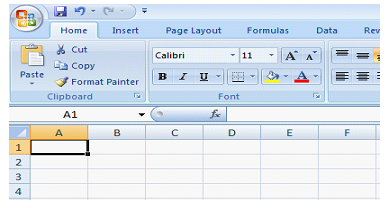
Type in your entry from the keyboard and notice the appearance of the entries in the formula bar with the cell address.
Press ‘Enter’ key.
EVALUATION
- What are the steps involved in creating a Spreadsheet?
- Explain how to enter data into Excel.
EDITING DATA IN A WORKSHEET
Wrong entries may either be entirely re-typed or the particular cell/range of cells can be corrected.
To retype:
Move the cell pointer to the cell to be corrected or re-type the entry and press ‘Enter’
To correct only the mistake:
Move the cell pointer to the cell and double click on the cell.
Make the correction by inserting, deleting or retyping.
Press ‘Enter’.
SAVING A WORKSHEET
Saving for the first time:
Click on ‘Home’ button,
Click ‘Save As’ button and wait for a dialog box to open.
Type in your desire filename (i.e. the name of the document).
Click ‘Save’ button or press enter on the keyboard.
Saving while working (after the first saving).
Click on ‘save’ icon on the Quick Access tool bar or click on ‘office button’ to open the menu. and click ‘save’ from the options.
RETRIEVING A SAVED WORKSHEET
Retrieving a worksheet means to open an already saved worksheet from its location in the computer. This is usually done to view, edit or update the worksheet.
Load/start Microsoft Excel
Click on ‘Office Button’
Click ‘Open’ option from the list and wait for a dialog box to open.
Navigate to the file you want to open and double click on it.
GENERAL EVALUATION
- Define a cell.
- State steps involved in saving a worksheet for the first time.
- Highlight the steps in retrieving a saved document.
READING ASSIGNMENT
A Handbook on Computer Studies for Schools and Colleges by Niyi Adekolegan
WEEKEND ASSIGNMENT
- ___ is a collection of cells organized into rows and columns where data is stored and manipulated. A. Worksheet B. Graph C. Workbook D. Active cell
- ___ is a space in a worksheet formed by the intersection of a row and a column.
A. Workbook B. Sheet C. Cell D. Cell Reference.
- There are ……… rows per worksheet in Excel. A. 1,048,576 B. 1,048,765
C. 1,408,576 D. 1,022,333
- There are ___ columns per worksheet in Excel. A. 16,387 B. 16,384 C. 16,684
D. 15,341
- The address of a cell is known as ___ A. Cell space B. Cell reference C. Cell Menu
D. Active cell
THEORY
- Highlight the steps in saving a worksheet
- In Excel, what do you understand by the term “retrieving”?
WEEK FIVE
TOPIC: CREATING AND EDITING GRAPHS
Charts are used to display series of numeric data in a graphical format to make it easier to understand large quantities of data and the relationship between different series of data.
To create a chart in Excel, you start by entering the numeric data for the chart on a worksheet. Then you can plot that data into a chart by selecting the chart type that you want to use on theInserttab, in theChartsgroup.
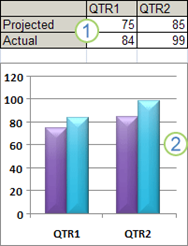
1. Worksheet data
2. Chart created from worksheet data
Excel supports many types of charts to help you display data in ways that are meaningful to your audience. When you create a chart or change an existing chart, you can select from a variety of chart types (such as a column chart or a pie chart) and their subtypes (such as a stacked column chart or a pie in 3-D chart). You can also create a combination chart by using more than one chart type in your chart. 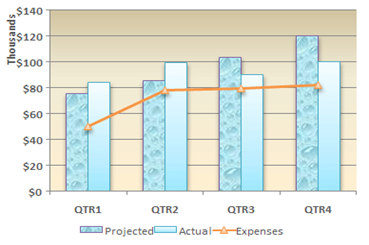
Example of a combination chart that uses a column and line chart type.
Get to know chart elements
A chart has many elements. Some of these elements are displayed by default, others can be added as needed. You can change the display of the chart elements by moving them to other locations in the chart, resizing them, or by changing the format. You can also remove chart elements that you do not want to display.
1. The chart area of the chart. 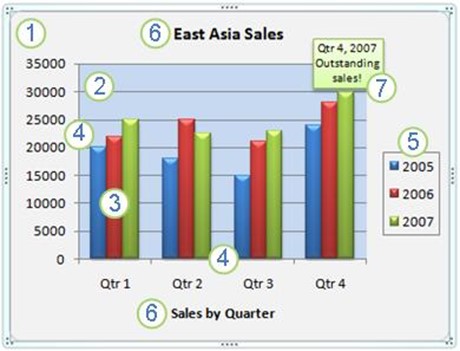
2. The plot area of the chart.
3. The data points of the data series that are plotted in the chart.
4. The horizontal (category) and vertical (value) axis along which the data is plotted in the chart.
5. The legend of the chart.
6. A chart and axis title that you can use in the chart.
7. A data label that you can use to identify the details of a data point in a data series.
Modify a basic chart to meet your needs
After you create a chart, you can modify any one of its elements. For example, you might want to change the way that axes are displayed, add a chart title, move or hide the legend, or display additional chart elements. To modify a chart, you can do one or more of the following:
- Change the display of chart axes You can specify the scale of axes and adjust the interval between the values or categories that are displayed. To make your chart easier to read, you can also add tick marks to an axis, and specify the interval at which they will appear.
- Add titles and data labels to a chart: To help clarify the information that appears in your chart, you can add a chart title, axis titles, and data labels.
- Add a legend or data table You can show or hide a legend, change its location, or modify the legend entries. In some charts, you can also show a data table that displays the legend keys and the values that are presented in the chart.
- Apply special options for each chart type Special lines (such as high-low lines and trend lines), bars (such as up-down bars and error bars), data markers, and other options are available for different chart types.
Apply a predefined chart layout and style for a professional look
Instead of manually adding or changing chart elements or formatting the chart, you can quickly apply a predefined chart layout and chart style to your chart. Excel provides a variety of useful predefined layouts and styles. However, you can fine-tune a layout or style as needed by making manual changes to the layout and format of individual chart elements, such as the chart area, plot area, data series, or legend of the chart. When you apply a predefined chart layout, a specific set of chart elements (such as titles, a legend, a data table, or data labels) are displayed in a specific arrangement in your chart. You can select from a variety of layouts that are provided for each chart type. When you apply a predefined chart style, the chart is formatted based on the document theme that you have applied, so that your chart matches your organization’s or your own theme colors (a set of colors), theme fonts (a set of heading and body text fonts), and theme effects (a set of lines and fill effects).
You cannot create your own chart layouts or styles, but you can create chart templates that include the chart layout and formatting that you want.
Add eye-catching formatting to a chart
In addition to applying a predefined chart style, you can easily apply formatting to individual chart elements such as data markers, the chart area, the plot area, and the numbers and text in titles and labels to give your chart a custom, eye-catching look. You can apply specific shape styles and WordArt styles, and you can also format the shapes and text of chart elements manually. To add formatting, you can use one or more of the following:
- Fill chart elements: You can use colors, textures, pictures, and gradient fills to help draw attention to specific chart elements.
- Change the outline of chart elements: You can use colors, line styles, and line weights to emphasize chart elements.
- Add special effects to chart elements: You can apply special effects, such as shadow, reflection, glow, soft edges, bevel, and 3-D rotation to chart element shapes, which gives your chart a finished look.
Reuse charts by creating chart templates
If you want to reuse a chart that you customized to meet your needs, you can save that chart as a chart template (*.crtx) in the chart templates folder. When you create a chart, you can then apply the chart template just as you would any other built-in chart type. In fact, chart templates are custom chart types — you can also use them to change the chart type of an existing chart. If you use a specific chart template frequently, you can save it as the default chart type.
EVALUATION
- State the steps to modify a chart
WEEKEND ASSIGNMENT
- ___ is a collection of cells organized into rows and columns where data is stored and manipulated. A. Worksheet B. Graph C. Workbook D. Active cell
- ___ is a space in a worksheet formed by the intersection of a row and a column.
A. Workbook B. Sheet C. Cell D. Cell Reference.
- There are ……… rows per worksheet in Excel. A. 1,048,576 B. 1,048,765
C. 1,408,576 D. 1,022,333
- There are ___ columns per worksheet in Excel. A. 16,387 B. 16,384 C. 16,684
D. 15,341
- The address of a cell is known as ___ A. Cell space B. Cell reference C. Cell Menu
D. Active cell
WEEK SIX
TOPIC: HACKING
Who is a hacker?
In the computer security context, ahackeris someone who seeks and exploits weaknesses in a computer system or computer network. Hackers may be motivated by a multitude of reasons, such as profit, protest, challenge, enjoyment, or to evaluate those weaknesses to assist in removing them. The subculture that has evolved around hackers is often referred to as the computer underground and is now a known community.
Hacking is usually a technical activity, although that does not necessarily mean that attackers are always technically capable. Most of the attackers arescript kiddies, who know just about enough in order to use other (more competent) hackers’ work. That fact aside, it is necessary to know the technical side of hacking, in order to understand the kind of knowledge that some attackers have. This section provides a brief explanation of how to get into a target system and how to exploit this as a full-scale hacking activity.
CRACKING COMPUTER SYSTEMS
There are many ways for attackers to obtain illicit access to computer systems. This kind of access is often called “intrusion”, and the first thing an intruder does is usually trying to obtain special/administrative privileges (a root access) on that system. Having a root access is very important for the attackers, since this means that they can do whatever they want on the system, including covering their tracks, strengthening their hold and doing damage.
In general, there are three main ways to intrude into a system:
- Physical Intrusion
This kind of intrusion happens when an intruder has a physical access to the target machine. This might allow the intruder to gain full control of the system – for example by booting with a special floppy or by taking the system apart physically (e.g. removing the Hard-drive to another system owned by the attacker, which then enables him/her to read/write to it).
- System Intrusion
In this case, it is assumed that the intruder has already got low-level privileges on the system. They then exploit un-patched security vulnerabilities in order to escalate their privileges to administrative level.
- Remote Intrusion
With remote intrusion, an attacker tries to get into the system remotely through the network. They initially do not have any privileges to the system, but one way or another – e.g. by finding out some valid account names and cracking their (usually weak) password, or by exploiting common security vulnerabilities (buffer overflow, etc.) – they manage to get in and obtain a root access.
This paper focuses on remote intrusion, as this is the most common type of attack associated with hackers. Nevertheless, there are some cases of system intrusion, for example, the insider attack, where a legitimate user (could be a disgruntled or former employee) performs an attack due to various reasons (revenge, cyber-espionage, etc.).
In order to minimize intrusion, many organizations installIntrusion Detection Systems (IDS). Such a system inspects inbound and outbound network activity and identifies suspicious patterns that may indicate a network or system attack from someone attempting to break into or compromise a system. There are many IDSs available. Most of these are commercial software and are primarily concerned with remote intrusion. We will not discuss IDS in great detail in this paper since our focus is on the attackers along with their hacking activities and some insights into their human aspects.
TYPES OF ATTACKS
Attackers can cause various levels of damage, depending on their skill level and/or their motives. There is a common pattern though: they usually follow a similar set of steps of information gathering before launching the attack.
Foot Printing
The aim of this activity is to obtain a complete profile of the target organization’s network and its security arrangement. The information of interest includes the technology that the organization is using (e.g. Internet, Intranet, Remote Access, and Extranet) and its security policies and procedures. Although there are many different methods attackers can use to perform foot printing, there are four general steps that they are likely to follow: − Determine the scope of the foot printing activities. In some cases, it might be a bit too much to determine all entities associated to a Target organization. Therefore attackers often need to narrow down the scope of their Foot printing activities.
Social Engineering
Social Engineering is the term used to describe cracking techniques that rely on weaknesses inwetware(i.e. human users attached to the system – administrators, operators, etc.) rather than software. The aim is to trick people into revealing passwords or other information that compromises a target system’s security.
Software Bugs
Another way to get into a system is through security vulnerabilities brought by bugs in the software (operating system, server daemons, client applications, etc.). It is almost impossible to have bug-free software and the attackers only need to find one hole in order to break in.
As a result, the program may crash and very often; this gives the attackers a root access and/or allows them to run any arbitrary code. Attackers can find buffer overflow bugs by:
- browsing the web for known buffer overflow vulnerabilities on certain programs;
- Searching for these bugs in the program directly if the source code is available;
- Examining every place the program prompts for input and trying to overflow it with random (massive) data. If the program crashes, there is a chance that by carefully constructing the input, access to the system can be obtained.
EVALUATION
- Briefly explain the 3 main ways to intrude into a system
- State the types of attacks
WEEK SEVEN
TOPIC: HACKER’S COMMUNITY
WHO ARE HACKERS?
Quoting Steele Denning reports that the wordhackerhas taken on many different meanings ranging from a person who enjoys learning the details of computer systems and how to stretch their capabilities to a malicious or inquisitive meddler who tries to discover information by poking around possibly by deceptive or illegal means. Interviewing hackers gave denning a more precise definition. One of them asserted:
“A hacker is someone that experiments with systems… [Hacking] is playing with systems and making them do what they were never intended to do. Breaking in and making free calls are just a small part of that. Hacking is also about freedom of speech and free access to information – being able to find out anything. There is also the David and Goliath side of it, the underdog vs. the system, and the ethic of being a folk hero, albeit a minor one.”.
The term “hacker” itself has evolved somewhat from its original meaning. Rogers breaks down the evolution into four generations:
- First generation: talented students, programmers and scientists (mostly from MIT)
These were academics or professionals interested in the working of computer code. They enjoyed tweaking the code, in order to produce more efficient or elegant program, or just to create program that can assist them in everyday computing life. They were the technically elite group and were often pioneers in their field (e.g. Richard Stallman).
- Second generation: technological radicals
They evolved from the technically elite, with forward thinking to recognize the potential of a second computer niche from mainframe to personal systems. Their radical nature means that minor criminal activity was not uncommon (e.g. phone phreaking).
- Third generation: young people who embraced personal computers (PC)
These people recognized the potential entertainment value of PC and began developing games (or making illegal copies of games and cracking their copy-protection).
- Fourth generation: the current generation, those embracing criminal activity as if it is some sort of game or sport.
Some of these people got arrested and claimed that the motivation was curiosity or hunger for knowledge, although the actual motivation seems to be greed, power, revenge or other malicious intent.
The public perception is that hackers are usually young males who tend to be working alone. With the proliferation of both the bulletin boards and of tool kits for virus makers, the last characteristic is questionable. On the values side, hackers share some particularities. For instance, Levy identified some behaviors and values in thehacker ethic, some of them having an obsession with “hands-on” use of computers, desire that all information should be in the public domain and mistrust of authority. Some more person logical dimensions have been identified by Gordon who examined the ethical development of a large number of virus writers. According to Gordon’s results, hackers can be divided into the following
Categories:
- Adolescent, who is not typically concerned by problems caused by their viruses;
- Adult, ethically abnormal;
- Ex virus-writer, undecided concerning the legitimacy of virus writing.
Hacker’s ethics
Some hackers’ ethics are not that far from more traditional views shared by the public at large. For instance, some hackers are concerned about the increasing amount of information about individuals that is stored in large data banks, and the inability of the individual to have much control over the use of that information.
HACKER’S TAXONOMY
Rogers did a study on hacker community and he proposed hackers taxonomy as follows:
- Tool Kit/newbie’sare people who are new to hacking and who tend to have limited computer and programming skills. As a result, they usually rely on software (tool kits) already written by other people in order to conduct their attack. These people are often calledscript kiddies.
- Cyber-punksconsist of people with better computer skills (than newbie’s) and some might have programming capabilities. It is their intention to engage in malicious acts, such as web defacement, credit card number theft, telecommunication fraud or spamming (sending junk mails).
- Internalsare made up of disgruntled employees or ex-employees. It may be surprising to learn that a lot of attacks were actually carried out by people with internal knowledge/connection.
- Coders
- Old guard hackersare similar to those of first generation hackers. They appear to be interested on the intellectual endeavor instead of criminal intention, but they seem to have little respect for personal property.
- Professional criminals
- Cyber-terrorists
These groups are not mutually exclusive, but they might help in understanding the motives of those individuals involved in hacking activities.
EVALUATION
- What are the proposed hackers taxonomy by Rogers
- Explain the four generations of Hacking
WEEK EIGHT
LOGIC CIRCUIT
A logic gate is an elementary building block of a digital circuit. Most logic gates have two inputs and one output. At any given moment, every terminal is in one of the two binary conditionslow(0) orhigh(1), represented by different voltage levels. The logic state of a terminal can, and generally does, change often, as the circuit processes data. In most logic gates, the low state is approximately zero volts (0 V), while the high state is approximately five volts positive (+5 V).
There are seven basic logic gates: AND, OR, XOR, NOT, NAND, NOR, and XNOR.
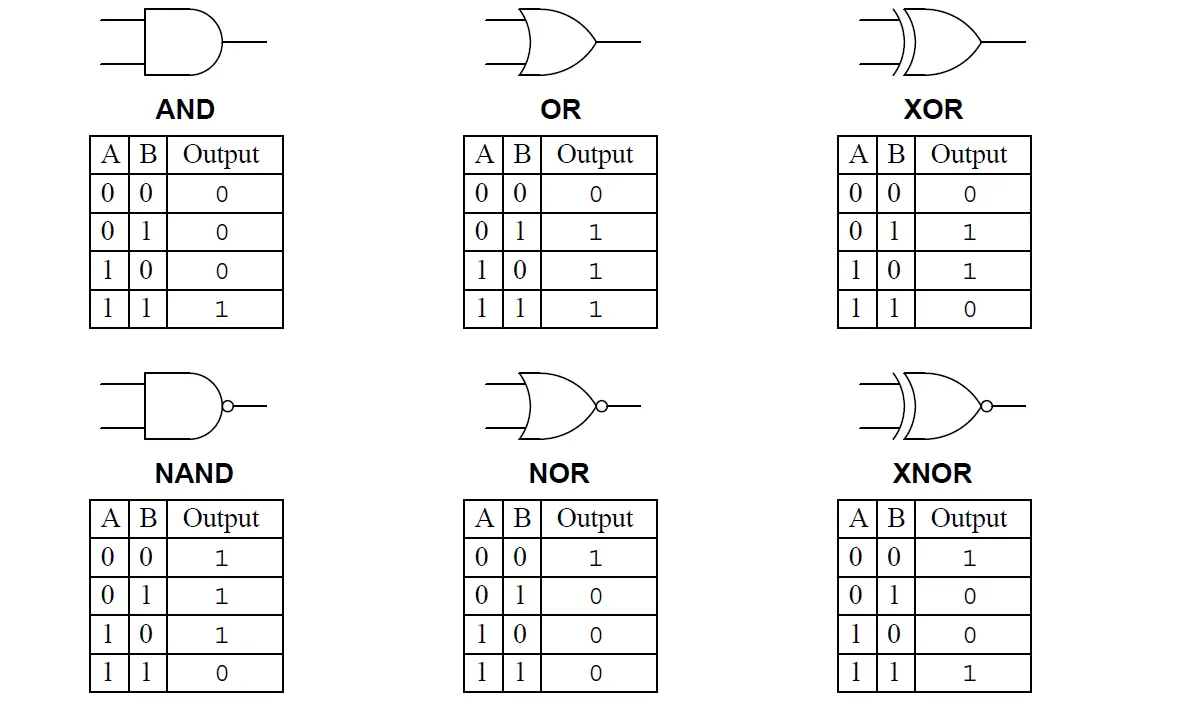 TheAND gateis so named because, if 0 is called “false” and 1 is called “true,” the gate acts in the same way as the logical “and” operator. The following illustration and table show the circuit symbol and logic combinations for an AND gate. (In the symbol, the input terminals are at left and the output terminal is at right.) The output is “true” when both inputs are “true.” Otherwise, the output is “false.”
AND gate
Input 1 | Input 2 | Output |
0 | 1 | 0 |
1 | 0 | 0 |
1 | 1 | 1 |
TheOR gategets its name from the fact that it behaves after the fashion of the logical inclusive “or.” The output is “true” if either or both of the inputs are “true.” If both inputs are “false,” then the output is “false.”
OR gate
Input 1 | Input 2 | Output |
0 | 1 | 1 |
1 | 0 | 1 |
1 | 1 | 1 |
TheXOR(exclusive-OR)gateacts in the same way as the logical “either/or.” The output is “true” if either, but not both, of the inputs are “true.” The output is “false” if both inputs are “false” or if both inputs are “true.” Another way of looking at this circuit is to observe that the output is 1 if the inputs are different, but 0 if the inputs are the same.
XOR gate
Input 1 | Input 2 | Output |
0 | 1 | 1 |
1 | 0 | 1 |
1 | 1 | 0 |
A logicalinverter, sometimes called aNOT gateto differentiate it from other types of electronic inverter devices, has only one input. It reverses the logic state.
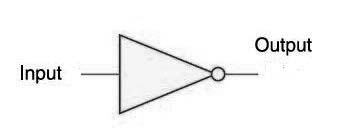 Inverter or NOT gate
Input | Output |
1 | 0 |
0 | 1 |
TheNAND gateoperates as an AND gate followed by a NOT gate. It acts in the manner of the logical operation “and” followed by negation. The output is “false” if both inputs are “true.” Otherwise, the output is “true.”
NAND gate
Input 1 | Input 2 | Output |
0 | 0 | 1 |
0 | 1 | 1 |
1 | 0 | 1 |
1 | 1 | 0 |
TheNOR gateis a combination OR gate followed by an inverter. Its output is “true” if both inputs are “false.” Otherwise, the output is “false.”
NOR gate
Input 1 | Input 2 | Output |
0 | 0 | 1 |
0 | 1 | 0 |
1 | 0 | 0 |
1 | 1 | 0 |
TheXNOR (exclusive-NOR) gateis a combination XOR gate followed by an inverter. Its output is “true” if the inputs are the same, and “false” if the inputs are different.
XNOR gate
Input 1 | Input 2 | Output |
0 | 0 | 1 |
0 | 1 | 0 |
1 | 0 | 0 |
1 | 1 | 1 |
Using combinations of logic gates, complex operations can be performed. In theory, there is no limit to the number of gates that can be arrayed together in a single device. But in practice, there is a limit to the number of gates that can be packed into a given physical space. Arrays of logic gates are found in digital integrated circuits (ICs). As IC technology advances, the required physical volume for each individual logic gate decreases and digital devices of the same or smaller size become capable of performing ever-more-complicated operations at ever-increasing speeds.
Uses of standard Logic Circuit
- Logic gates are building blocks of hardware electronic components.
- It is used in activation of door bells.
- The AND gates use to combine multiply signals
- The NOT gate is used in building a switch.
EVALUATION
State the uses of standard Logic Circuit
WEEK NINE
TOPIC: COMPUTER CAREER OPPORTUNITIES
CAREERS IN COMPUTER INDUSTRY
Now a day’s computer industry is the largest industry where jobs are created for thousands of people and primary business people and primary businesses which are computer related jobs.
Computers have become a ubiquitous part of modern life, and new applications are introduced every day. The use of computer technologies is also commonplace in all types of organizations, in academia, research, industry, government, private and business organizations. As computers become even more pervasive, the potential for computer-related careers will continue to grow and the career paths in computer-related fields will become more diverse.
The career opportunities for computer science graduates can be classified into different categories. Examples are:
- General business and IT development
- Computer equipment field
- Computer software field
- Computer service and repair filed
- Computer sales
- Computer education and training field
- IT consultation
- Programming and Software Development.
- Information Systems Operation and Management.
- Telecommunications and Networking.
- Computer Science Research.
- Web and Internet.
- Graphics and Multimedia.
- Training and Support.
- Computer Industry Specialists.
Programming and Software Development
- Systems consultant – Works under contract to install or configure hardware or software, write or customize programs, or otherwise help solve information processing problems for an organization. Business-related courses are helpful.
- Software engineer – Designs and writes complex computer programs as part of a software development team. Applies principles of computer science to solve practical problems.
- Systems programmer – Designs and writes programs that interface with a computer’s low-level operating system, such as device drivers and utilities.
- Database analyst – Designs and creates programs used to collect, maintain, and analyze data needed by business, government, or other institutions. Adapts programs to changing business needs.
- Artificial Intelligence programmer – Applies principles of artificial intelligence to design and implement systems that perform complex tasks. Applications include: expert systems that apply rules to making decisions, such as scheduling freight shipments or diagnosing disease; pattern recognition systems that give robots the ability to see and understand objects in their environment; neural network programs that can learn to perform tasks by constantly re-evaluating their performance.
- Scientific applications programmer – Works closely with scientists and engineers to write programs that simulate natural phenomena or analyze experimental results, or apply scientific or engineering principles to research or manufacturing.
- User interface designer – Designs the menus, icons, and other features that people will use to interact with a computer program or operating system. Needs to have empathy with computer users and artistic sense of composition.
- Embedded systems application programmer – Designs and develops applications for appliances and entertainment products such as PDA, mobile phone, mp3 player.
Information Systems Operation and Management
Electronic data processing (EDP) auditor- Closely examines data processing operations to guard against loss through mistakes, carelessness, or fraud. Often work in banks, insurance companies, accounting firms, and other organizations that use a large amount of financial data.
Database administrator – Takes overall responsibility for the usage, accuracy, efficiency, security, maintenance of an organization’s database systems. Coordinates development and use of data resources.
Systems administrator – Responsible for managing the operation of a multi-user computer system or network so that it runs reliably and meets user’s needs; updates and configures software and hardware; provides assistance to users and managers.
Computer security specialist – Protects computer systems from illegal intrusions, viruses, data theft, fraud, or other forms of tampering.
Management/IT consultants – Uses problem solving skills and computer knowledge to solve business and management problems for organizations and foster improvement in areas such as organization structure, business communication, and productivity. Defines and analyzes problem, interviews employees, develops possible solutions, and presents options to client.
Information systems manager – Oversees all operations in an organization’s information system department, including technical support, training, network, and database operations. Ensures that everyone in the organization has timely, reliable access to the computer system and its databases and other resources.
Chief information officer (CIO) – Serves as the highest information services executive for a major corporation. Responsible for long-term planning and setting organization-wide policy and standards relating to all computer-related activities.
Telecommunications and Networking
Network engineer/consultant
Plans for the installation or expansion of local or wide-area computer networks. Performs complex configuration of servers, hubs, routers, and other network communications equipment. Writes scripts or programs to automate network operations.
Network administrator
Takes overall responsibility for the operation and planning for a local or wide-area computer network. Plans expansion; selects appropriate network operating system and software tools; configures major features; deals with connection between local network and Internet; establish procedures for support staff and users.
Computer Science Research
Computer scientist/researcher
Applies theoretical expertise to complex problems and develop innovative ideas necessary for the application or creation of new technology. They usually work in research labs or academic institutions.
Computer science professor
Teaches college courses in computer science theory, performs research and supervises student research. May serve as consultant to government or business.
Artificial Intelligence researcher
Develops programs to imitate the thinking and reasoning processes of the human brain; for example, recognize voices and objects, speak in a humanlike voice.
Data miner
Analyzes databases in business, government, or scientific applications in order to extract additional information or find useful patterns. Needs familiarity with major database and statistical packages.
Bioinformatics specialist
Organizes and manipulates information relating to genetic sequences, molecular structure, and other data relevant to the biological sciences. Should be familiar with genetics and biochemistry.
Medical imaging specialist
Develops image processing and pattern recognition algorithms for analyzing medical images to diagnose disease.
Web and Internet
Internet applications programmer
Develops programs that add features such as forms and animation to Web sites or that provide tools to help users get the most out of Internet.
Internet consultant
Uses some combination of analysis, design, programming, and support skills to help clients with the design of Internet sites and configuration of Internet software and connections.
Webmaster
Creates or maintains a Web site. Provides content and programming or supervises writers and programmers. Monitors the performance and popularity of the site. Provides secure forms and transactions for Internet-based businesses.
Internet advertising designer
Creates effective advertising features for Web sites, including animation, sound, and text.
Graphics and Multimedia
Animation/Special effects developer
Develops software programs for creating sequences of computer images for games or movies.
Multimedia developer
Uses design and programming skills to create interactive multimedia products that combine sound, images, and text.
Computer game designer/programmer
Designs or writes computer games or game engines. Develop algorithms that make the characters realistic and intelligent.
Electronic sound producer
Creates the music, voice, and sound effects for multimedia or computer games. Integrates sound into the overall design of the multimedia product.
Training and Support
Technical support representative
Answers questions from computer users and solves problems with the installation or operation of software. Researches problems using manuals, help files, and online knowledge bases.
Trainer, software applications
Teaches specific courses in computer software or operating systems. May work within a corporation or at a school.
Technical writer
Writes instructional guides and other materials that explains how to use computer systems, software, operating systems, or programming tools. Researches and writes reviews and feature articles suited to specific reader profiles.
CERTIFICATE:This is the process of verifying the technical knowledge of an individual who has demonstrated competence in a particular area, today there are more than 200 certificates available, such as.
- MICROSOFT CERTIFIED APPLICATION SPECIALIST
- MICROSOFT CERTIFIED APPLICATION PROFESSIONAL
- MICROSOFT CERTIFIED DESKTOP TECHNICIANS and so many more.
EVALUATION
- Briefly explain the career opportunities of computer science graduates
WEEK TEN
TOPIC: QUALITIES OF A GOOD COMPUTER PROFESSIONAL
Computer professionals are information technology. The definition has extended to those involved in the internet industry too, those who deal with the computer industry to develop something. They may design, build, write or sell software. Acomputer professionalis a person who works in the field of
Acomputer professionalmay be:
- A person working in the field of information technology
- A person who has undergone training in a computer-related field colleges, universities and computer institutes
- A person who has an extensive knowledge in the area of computing.
Some of the qualities needed to be most successful in the computer and IT world include the following:
- Excellent Analytical Skills
Great computer professionals have excellent analytical skills that can be applied to solve problems or develop new ideas. - Versatility
A computer professional must be versatile, it is a necessary requirement needed by a professional who wants to be successful. The most successful computer professionals will be the ones who have skills that extend beyond information technology, such as skills in business and finance. - Commitment to Learning
Technology is constantly changing, and those who keep abreast of the latest developments in information technology are the ones who will be the most successful. Knowledge and keeping up with the latest trends is the key to success; there is no single person who knows everything. - Good Knowledge of Math
Strong mathematical skills are necessary because math is used in many computer applications, such as when dealing with circuits or programming. - The Ability to Learn & Memorize Programming Languages
Computer professionals must know many programming languages and how to use a wide variety of computer software programs. A great memory helps keep work efficient. There is a wide range of programming languages that are widely used for coding and writing programs, so memorizing all of them is what a decent specialist should be able to do. - Good Communication Skills
The soft skills of verbal and written communication are increasingly important as non-techies rely on technological tools for their everyday business. Understanding a client’s needs and the ability to meet those needs depend heavily on a steady stream of open communication. Those who are not familiar with technology can be confused when the computer technology specialist uses a lot of industry register, so you have to be able to switch between work speech and casual speech quickly. - Attention to Detail
The slightest mistake can affect how a web page looks or how a program runs. Computer personnel must pay close attention to detail to ensure everything works correctly and efficiently. - Multi-tasking Ability
People working with computers are often involved in many tasks at once and must be able to manage all of their responsibilities simultaneously. Time management skills and an ability to prioritize are assets as well. - Technical Writing Skills
Technical writing skills help a computer-savvy person explain complex concepts to those who have limited knowledge of the computer world.
QUALITIES OF A GOOD COMPUTER PROFESSIONAL
- COMPUTER MANAGER
- Must have ability to control, coordinate and manage things.
- High level of Computer literacy.
- Versatility in the field of Computer
- Good decision maker when it comes to computer related issues
- COMPUTER SCIENTIST
- Good knowledge of a Computer
- Ability to repair and maintain a computer
- Must be able to identify good computers
- COMPUTER ENGINEER/HARDWARE ENGINEER
- Excellent knowledge of Computer repair
- Computer parts assemblage
- Should be able to build at least a circuit board.
- PROGRAMMER/SOFTWARE ENGINEER
- Good computer programmer must be able to give instruction to computer.
- Use of computer programming language to develop program.
- Ability to develop a good and durable program.
- Must be able to detect or debug problem in a program.
- COMPUTER INSTRUCTOR/EDUCATOR
- Teaches and trains people on the use, misuse and care of computer
- Impacts knowledge into computer illiterates
- Good knowledge of computer and effective operation
- COMPUTER TECHNICIANS
- Good computer technician repairs computer
- Assemblage of computer parts
- Troubles shooting of Computer problems
- Computer hardware maintenance and repair
- COMPUTER ANALYST/ SYSTEM ANALYST
- Ability to analyze data
- Train people on computer usage
- Solve computer problems.
- Computer setup in work places and schools
- NETWORKING ENGINEER
- Computer networking
- Troubleshooting of faulty networks
- Network configuration.
- Internet networking.
- Network update knowledge
- COMPUTER OPERATOR
- Fast typing skills.
- Use of graphics package for design
- Excellent use of computer for documents
- Effective operation of the Computer
EVALUATION
- State some of the qualities needed to be most successful in the computer and IT world
- State general qualities of a good Computer Professional


